Landmark Habitat, explored floor by floor
- Made for
- Landmark Habitat, a concept residential developer with sample projects
- Live site
- landmark.weezlab.com
- Scope
- Real estate web design
- Interactive 3D development
- Floor plans & unit data
- Enquiry flow & structured data
- Status
- Live demo with sample data, October 2026
Buyers pick a home they cannot see yet.
Apartments are often sold before the building stands. Buyers decide from a brochure and a stack of floor-plan PDFs, and still cannot tell where a home sits in the building, which way it faces or whether it is still for sale.
Sales teams answer the same questions on every call and send the same files again. We built Landmark Habitat as a demo to show how a developer's website could answer those questions itself.
The building is the menu.
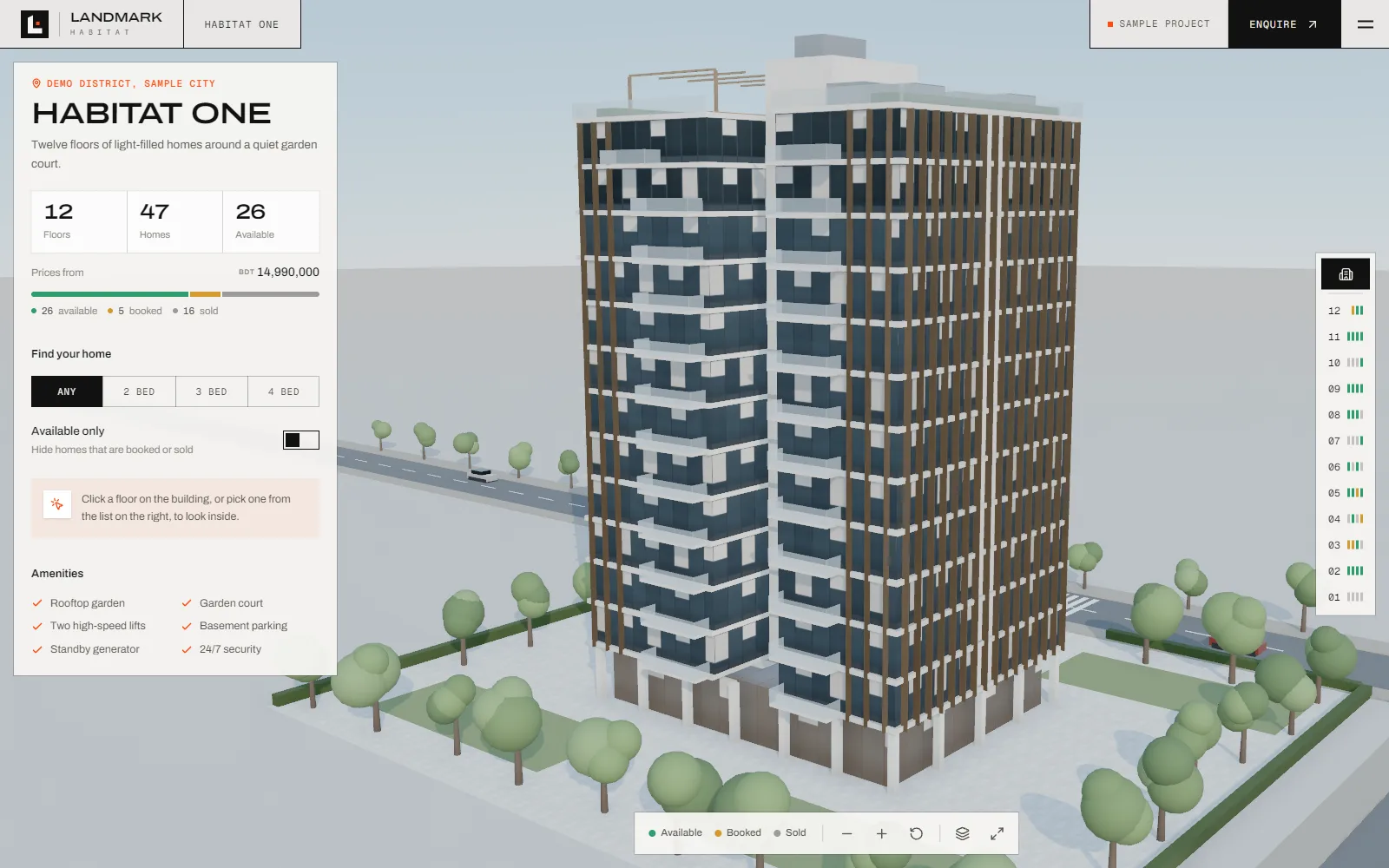
Each project opens on an interactive 3D model of the building. Visitors orbit it, pick a floor from the building or a rail beside it, and the floors above lift away so that floor can be seen on its own, with every home coloured by whether it is available, booked or sold.
Opening a home flies the camera to it and shows its price, bedrooms, bathrooms, size, facing and a 2D floor plan, with an enquiry form one click away. Every floor and every home has its own link, so a sales agent can send a buyer straight to Unit 05B.
Start with the building. Then open a floor.
Building viewAvailability at a glance Floor viewEvery home on the floor
The exterior view shows how many homes are left and what they cost, with filters for bedrooms and availability. Opening a floor lifts away the levels above and lists each home on it with its type, size, facing, price and status.
Open a home. Everything a buyer asks first.
Home viewPlan, price and status HomepageThe building up front
Each apartment shows its rooms labelled in 3D beside a 2D floor plan, price, bedrooms, bathrooms, area and facing, with an enquiry button and arrows to the next home on the floor. The marketing pages share the same building on the homepage.
Explorer highlights. Four decisions behind the 3D tour.
A building you can take apart
The 3D model is split into floors and homes, not one solid shape. Hovering a floor highlights it, choosing it lifts the floors above out of the way, and an exploded view spreads every level apart like a stacking diagram. It works with a mouse, touch and the keyboard.
Availability in colour
Homes are coloured available, booked or sold in 3D, in the floor list and on the floor rail, and filters hide everything that does not match the buyer's bedrooms or is already taken.
A link for every home
Every floor and apartment has its own address and page, so agents can share a single home and search engines can read each one, with apartment, price and availability marked up as structured data.
A new project is a data file
Floors, floor plans, homes, prices and status live in one data file per building, linked to the 3D model by name. Adding a project means a model and a file, not new code. The demo runs four sample buildings, one generated from its floor plans and three from open-licence models.
What it shows. A sales tool that works before the building does.
- Sample buildings to explore
- 4
- Homes with plans, prices and status
- 73
- Levels of detail: building, floor, home
- 3
Our own identity, built as a system: a square mark built from our initials on a strict 45° grid, pointing up and to the right, a teal palette with a single accent, a woven pattern and two typefaces, carried from the logo to signage and stationery.